Skip to content

Gunmetal Grey 6n2

Featured Replies

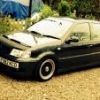
So here it is my new polo 6n2 :D, after countless hours of online searching and a 2 hour drive to go get it, I finally managed to get one in an uncommon colour (when I say uncommon I really mean iv'e never seen another grey one before I bought this one). So heres the first pics obviously work will be done however it will take time as I'm not on a huge income at the moment (Damn education :x).

post-118319-1359895438_thumb.jpg

post-118319-1359895612_thumb.jpg

So there it is feel free to leave comments:) future work will probably include:

. coil overs.

. Dark coloured euro wheels not entirely sure which exact ones yet.

. replace the exhaust with a newer and sportier one.

. gti grill and de-badge the back but leaving the VW badge on.

. Induction and maybe new ignition poarts such as spark leads, msd coil pack etc.

. and few bits to the interior nothing to over the top though.

  • Replies 7
  • Views 1.7k
  • Created
  • Last Reply

Top Posters In This Topic

Posted Images

best colour ;) looks a good base, sounds like you have some solid plans :)

  • Author
best colour ;) looks a good base, sounds like you have some solid plans :)

yeah I had a white 6n2 before and planned loads on it got half way then the thing started having so many problems I just sold it.

  • 2 weeks later...

mines this colour! a 3 door though, it is pretty uncommon. do you know the paint code/name of the actual colour?

  • Author
mines this colour! a 3 door though, it is pretty uncommon. do you know the paint code/name of the actual colour?

Yeah the colour is gunmetal grey i believe I'm not sure of the actual code though

mines this colour! a 3 door though, it is pretty uncommon. do you know the paint code/name of the actual colour?

Yeah the colour is gunmetal grey i believe I'm not sure of the actual code though

It's blue anthracite (something like bleu anthratiz) which is code LC7V.

here was mine before i trashed it :(

post-107487-1361482195_thumb.jpg

  • Author
here was mine before i trashed it :(

post-107487-1361482195_thumb.jpg

Looks sick :D

Create an account or sign in to comment

Recently Browsing 0

  • No registered users viewing this page.

Account

Navigation

Search

Search

Configure browser push notifications

Chrome (Android)
  1. Tap the lock icon next to the address bar.
  2. Tap Permissions → Notifications.
  3. Adjust your preference.
Chrome (Desktop)
  1. Click the padlock icon in the address bar.
  2. Select Site settings.
  3. Find Notifications and adjust your preference.