Skip to content

Is my polo a 6n2?

Featured Replies

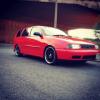
Hi guys. Fairlynew to this. Just bought a polo estate 2001 plate. Very rare apparently. Want to do a few mods to it i.e angel eyes debadged grill etc. I have a feeling its a 6n2 but not sure. If anybody could comfirm what it is thatd be great. Thanks.

  • Replies 15
  • Views 810
  • Created
  • Last Reply

Top Posters In This Topic

Posted Images

If its an estate no its not its a 6kv I think

  • Author

Sorry about the quality its this.

post-914733-0-16710900-1392747954_thumb.

It will have 6n2 dash but not a 6n2.

  • Author

It has a MK5 Dash so iv been told but all I need to know the correct model for is my angel eyes (If they exsist, link would be appreciated) & the coilovers. Oh n a debadged grll lol

I used to own a y plate estate in same colour, is yours diesel version. Mk5 dash is 6n2 dash. Coil overs would been mk4 6n set.

  • Author

Yea 1.9 SDI 2001 Ah ok its like learning a new language all this 6n 6n2 6kv shit lol


What about angel eyes for it

Not sure on those - the estate version in se spec was the most expensive polo at the time, does yours have air con?

You'll find the grill lights etc will be from either the caddy van or a seat ibiza mk2 93~99 as they share the same front end, same for the suspension.

  • Author

Cheers for the info :)

If they're for the caddy or Ibiza then they should be good, you often see Morrette lights with a badgeless grill complete for sale

  • Author

HUmmm dont know wether to take the risk of ordering them. Only thing thats concerning is this on one complete unit whereas my headlight n indicators are seperates :/

I had some cheepo angels like them but they were for my 6N and LHD they also were a single unit unlike the standard two items

  • Author

Ah oki nothings simple is it may go for them then hope for the best lol

Hmm...if you debadge the grill it could be mistaken for a Seat Cordoba Vario. I think these Polo Estates were just rebadged Cordobas, weren't they? Just a thought!

Create an account or sign in to comment

Recently Browsing 0

  • No registered users viewing this page.

Account

Navigation

Search

Search

Configure browser push notifications

Chrome (Android)
  1. Tap the lock icon next to the address bar.
  2. Tap Permissions → Notifications.
  3. Adjust your preference.
Chrome (Desktop)
  1. Click the padlock icon in the address bar.
  2. Select Site settings.
  3. Find Notifications and adjust your preference.