Skip to content

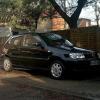
Sam's 6n2 1400 8v

Featured Replies

Model: Polo mk4 6n2

Engine: 1400 8v mpi (Power = 60bhp, Torque= 115Nm)

Wheels: Mk2 Golf GTI BBS's, with crapy tyres lol

Exterior Styling:[/b] De-baged/de-wipered

Interior Styling: Standard

Plans: Lowering 60mm, wheel refurb and some good tyres, gti grill/splitter/spoiler, smoothed bumpers, smoked side repeaters, smoked crystal headlights, front fogs, Xenon conversion, tinited windows

post-9310-1175962647_thumb.jpg

post-9310-1175962763_thumb.jpg

post-9310-1175962798_thumb.jpg

post-9310-1175962852_thumb.jpg

  • Replies 6
  • Views 4.7k
  • Created
  • Last Reply

Top Posters In This Topic

Posted Images

i'm liking the plans, looking forward to seeing the outcome. An idea might be to change the seats, as blue doesn't really match the black exterior

  • Author
i'm liking the plans, looking forward to seeing the outcome. An idea might be to change the seats, as blue doesn't really match the black exterior

yer don't like the seats either, was thinkin about going black leather, but i can't be arsed with that at the mo just focusing on the exterior :thumbsup:

  • 1 month later...

Whoo another 4x4 just like mine :) lol but i avent got enough money to lower it sadly :( but the plans sound good, will be looking very smart in no time

John

  • 5 months later...

thats realy nice dude, i want a black 1 for my first car which i hopefuly should be getting this month ( fingers crossed) if i were you next thing id buy would be some fog lights for the front they look so nice on the 6n2's.

  • 4 weeks later...

My reclining buckets are going in mine soon so if you want some match spec all black seats give us a shout, be better than sitting in my garage till i sell the car on...

  • 2 years later...

Hmm, blue interior on a black car? Nahhh! I've got the same interior, but at least my car's blue too.

Cant wait to see the mods, especially the dark indis!

Create an account or sign in to comment

Recently Browsing 0

  • No registered users viewing this page.

Account

Navigation

Search

Search

Configure browser push notifications

Chrome (Android)
  1. Tap the lock icon next to the address bar.
  2. Tap Permissions → Notifications.
  3. Adjust your preference.
Chrome (Desktop)
  1. Click the padlock icon in the address bar.
  2. Select Site settings.
  3. Find Notifications and adjust your preference.