Skip to content

Smauge

Featured Replies

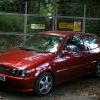
Boring pics will get some more later on...

post-13250-1193260043_thumb.jpg

post-13250-1193260107_thumb.jpg

post-13250-1193260150_thumb.jpg

  • Replies 19
  • Views 1.7k
  • Created
  • Last Reply

Top Posters In This Topic

Posted Images

I like that.. Very nice!!! :)

Nice car 8-)

Were they taken at billing?

that looks sweet :-)

I have those alloys!

Very nice!

  • Author

Thanks for the ' I like's ' :oops:

Yes I took them at billing this year on the sunday.

  • Author
I have those alloys!

Very nice!

Hah I bet you're alloys are in better condition than mine! They look like they've been introduce to a few curbs. They were on it when I bought it. Honest, I don't have a tendency to treat my wheels like that!

Thinking of getting a set of Rota Slipstream's in flat black.

nice :thumbsup: but whats a smauge lol :oops:

  • Author

Hah, Pet Name. His full name is Smauge the Red Dragon. My Auntie named it before i had a chance to stop her...

As far as I can tell he was a guardian in The Hobbit? I think it's a J.R.R. Tolkien Job

^^ haha ok fair does... but god some car pet names aint half random...

  • Author

Haha, too true, my Aunt has always named her cars after Tolkien characters, except for the one she has now which she doesn't like and therefore calls Shitty Peugeot, she had a mk2 squareback called frodo too.

Hmmmmm Theres Something about them lights i just dont like!

Other than that it looks ok, Any Plans???

  • Author

Yeh lots. I want to have the rubber tracks on the roof removed and smoothed, maybe with a run-off channel maybe not.

Bumpstrips are off, just gotta clean the gunk off.

Rota Slipstream alloy's in flat black.

Not sure about the lights, I'm not getting rid of them but I'm wondering about painting them black because when you get up close they are actually transparent.

Thinking of colourcoding the splitter and painting the grille surround black.

Maybe mk5 mirrors or some dtm style ones but the dtm jobs I've seen aren't electric and I'm a fussy b*

Red seatbelts

New seats, not sure what from but definately gonna get donor seats rather than re-upholster mine.

And undoubtedly I shall find more bits that need to change...

This could become ongoing :-D

Ooooooh, same colour as my old one. I do love that colour when it's all polished up and looking shiny :-D

Sal. x

  • Author

I love this colour too. I just haven't had the time to clean the git lately.

Funny how I'm listening to Chumbawumba when i open this thread :lol:

What are you doing about red seatbelts? Can you get them, or are you dying yours?

Hmmmmm Theres Something about them lights i just dont like!

Other than that it looks ok, Any Plans???

Yeah me too just dont like them lights,think you should get rid of them.........give you £20 for them,lol :lol:

  • Author

Nooo, you leave my lights out of this you meanies :lol:

I hadn't thought about dying, I was just gonna nick em from anything with a gti badge on it. They tend to have red 'belts. Dying could be an option though. It depends how they are coloured at the moment and wheter they are man made black or not i suppose

Edited by Tubthumper

Nooo, you leave my lights out of this you meanies :lol:

I hadn't thought about dying, I was just gonna nick em from anything with a gti badge on it. They tend to have red 'belts. Dying could be an option though. It depends how they are coloured at the moment and wheter they are man made black or not i suppose

they are the best light for the mk4 i think ,i even prefer them to angle eyes

  • Author

I think if I ever had to replace them Angel Eyes would be the ones I got. If I couldn't find any others of these ones!!

Edited by Tubthumper

Create an account or sign in to comment

Recently Browsing 0

  • No registered users viewing this page.

Account

Navigation

Search

Search

Configure browser push notifications

Chrome (Android)
  1. Tap the lock icon next to the address bar.
  2. Tap Permissions → Notifications.
  3. Adjust your preference.
Chrome (Desktop)
  1. Click the padlock icon in the address bar.
  2. Select Site settings.
  3. Find Notifications and adjust your preference.