Skip to content

I'm new!!

Featured Replies

hey everyone! :-D I'm new to this but just thought i would say hi to you all! ;)

  • Replies 113
  • Views 9.7k
  • Created
  • Last Reply

Top Posters In This Topic

hey get some piccies of you are car up & welcome! :thumbsup:

Hey, welcome to the funny farm!

We are pic crazy, get some up!!!

Hello and Welcome :-D

Sal. x

Helloo :D

hello welcome to CP

Welcome... Pics please :)

  • Author

yeah i should have been more organised and got my pictures sorted first! :oops: X

Welcome to club polo :-D

We are all intitled to make mistakes, one more and your out!!! :evil:

Only joking! Go take some soon!

Welcome :-)

hello and welcome....

get some pics up so we all know what sort of motor you own

welcome to la la land! officially known as club polo!

Pics and plans please!

  • Author
We are all intitled to make mistakes, one more and your out!!! :evil:

Only joking! Go take some soon!

haha, i will try harder next time! :lol: xx

welcome aboard.....

hope u enjoy you are time on club polo

regards

baby dubz for life

welcome to the mad house

hey.

welcom to cp.

get some pics of your car up.

Hey welcome to cp

Chells :-D

Word to you momma, aiiiight.

  • Author

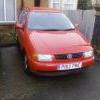
hey guys, i have added the only pic i have at the mo, its not at the best angle but its better than nothing!! :o

woooooo!

reds the best colour :-D

  • Author
reds the best colour :-D

well believe it or not i was actually looking for a blue or black fiesta but opted for this lovely little polo instead! :-) its my first car, i only passed a couple of weeks ago x

Edited by lucym

reds the best colour :-D

well believe it or not i was actually looking for a blue or black fiesta but opted for this lovely little polo instead! :-)

good that you got a polo then , buying a ford is a step in the wrong direction

reds the best colour :-D

Damn right it is 8-)

John

Oh and welcome to the club

Create an account or sign in to comment

Recently Browsing 0

  • No registered users viewing this page.

Account

Navigation

Search

Search

Configure browser push notifications

Chrome (Android)
  1. Tap the lock icon next to the address bar.
  2. Tap Permissions → Notifications.
  3. Adjust your preference.
Chrome (Desktop)
  1. Click the padlock icon in the address bar.
  2. Select Site settings.
  3. Find Notifications and adjust your preference.