Skip to content

Another noob, and his polo....

Featured Replies

Orate folks!!

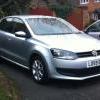
Another noob joining up, one day after getting my first car, which as you've probably guessed is a Polo, V reg dark grey 1l.

TBH, I know nothing bout modification or how cars work but I'm hoping to get into it after looking at some of the dam fine motors on here.

Eventually, I'm hoping mod it up Euro style (smoothed off, small fat wheel and that lark) so if any one knows any websites, or garages in the Stoke area that have some descent stuff in, or if any of you lot have any advice I'd be very happy to know.

Piccys below of motor!

http://img88.imageshack.us/img88/1019/dsc00717ad2.jpg

http://img219.imageshack.us/img219/6927/dsc00718dd0.jpg

  • Replies 16
  • Views 1.6k
  • Created
  • Last Reply

Top Posters In This Topic

Welcome to club polo :thumbsup:

take the polo and the 1l badges of the back first m8

Welcome to CP, as above and paint the badge black, it will get u started..

welcome to club polo mate. from stoke aswell.

lad called dave farrell in stoke is a mint sprayer etc. does a cracking job!

Looks cool mate, ideal base. Theres a few of us round cheshire/staffordshire if you need a hand

Sam

fetch me some n00bcake I'm hungry

Welcome to the forum.

  • 2 weeks later...

welcome to the forum like sammyc24 said few of us about if u need a hand wiv anything :]

looks very tidy. clear indies all round + debadged grill and you are off!

I'm from stoke aswell, volksmine usually have alot of 2nd hand wheels for sale in cobridge

Welcome to CP mate, nice looking car, always liked that colour.

nice.. welcome to cp. ;)

Welcome mate, nice ride.

Simon

ello :D

Looks liek a nice example mate. First thing I would do it sort that ride height out (PM me if you want some coilies), then get some wheels.

Remove the badges too!

hi noob, i'm newbie, how you? :roll: welcome man :thumbsup:

Edited by Dr Parsley

Create an account or sign in to comment

Recently Browsing 0

  • No registered users viewing this page.

Account

Navigation

Search

Search

Configure browser push notifications

Chrome (Android)
  1. Tap the lock icon next to the address bar.
  2. Tap Permissions → Notifications.
  3. Adjust your preference.
Chrome (Desktop)
  1. Click the padlock icon in the address bar.
  2. Select Site settings.
  3. Find Notifications and adjust your preference.