Skip to content

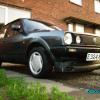
mk2 polo malibu on ATS CLASSICS

Featured Replies

went and got this from leicster on thursday !

When i got it !

polo003.jpg

then the "Detailing" stuff came out !

polo006.jpg

polo005.jpg

polo007.jpg

polo008.jpg

polo004.jpg

polo009.jpg

pics dont do it justice at all

then today i painted the bumper inserts red

polo012.jpg

polo013.jpg

what you think ?

Edited by a$h

  • Replies 21
  • Views 2.1k
  • Created
  • Last Reply

Top Posters In This Topic

nice why is it called a malibu?

Nice work mate. The first "cleaned" picture shows just how well the paint has come up, some good depth there for an old car.

I reckon it needs the steels painting next and maybe some lower profile tyres - 165/65 or 175/60's if they're 5 1/2 J rims?

Got any plans for it?

I'm liking the look of the Coupe S in your avatar too, got any more pics?

:shock: that paintwork comes up brilliantly for a car that is almost 20 years old, nice touch with the red inserts aswell :thumbsup:8-)

Nice, I thought it was going to be white with a malibu theme lol.

Did you mask and rattle can the bumper just straight on with red or did you use a plastic primer and any keying of the surface?

I was just going to use the same trim tape I used on the grill, looks cool anyway..

Looks amazing. Its amazing how tough old VW paint is.

Looks good mate ..

I did the same with my bumper insert's took bloody ages !

As asked above how did you do them ??

a malibu...nice!

love the rare mk2 editions. especially when they're mint like that

  • Author

cheers yall !!

bumpers took 1hour max !

just took the inserts out cleaned them then used plastic filler primer and then sprayed mars red !

cheers yall !!

bumpers took 1hour max !

just took the inserts out cleaned them then used plastic filler primer and then sprayed mars red !

Were they easy to remove and put back then ?

I didnt take mine out as i thaught i would never get them back in ..

I had to mask everything off ..

Damn i should of taken them out :lol:

  • Author

where they fix into the bumper there is a little metal clip at each end romove that and the slide out

it needed a bit of glue to make it fit snug again bit nothing major !

  • Author

rear bumper

005.jpg

006.jpg

015.jpg

That paint came out amazing. Red always fades worst but comes up the nuts!

  • 3 weeks later...

bit late, but i must say this looks spot on, couple of questions, firstly were you get the clear indicator lens from, are they polo ones or do golf ones fit and secondly how have you hit it with the lowerin stick, have the chopped the springs or put collies on, lookin for the cheapest way to get a good stance, ta :thumbsup:

  • Author
bit late, but i must say this looks spot on, couple of questions, firstly were you get the clear indicator lens from, are they polo ones or do golf ones fit and secondly how have you hit it with the lowerin stick, have the chopped the springs or put collies on, lookin for the cheapest way to get a good stance, ta :thumbsup:

the indicators came with the car so couldnt tell you

the lowering kit is a ta tecknix kit and its fookin low as to where i cant go over speedhumps at all

also its now pimpin ats classics on 175/50's

excuse the dirt :oops:

DSCF1024.jpg

DSCF1033.jpg

DSCF1032.jpg

DSCF1029.jpg

look nice matie! :thumbsup:

looks quality mate, cars come on leaps and bounds wiht a bit of elbow grease and a freshen up :thumbsup:

awesome. nice job. 8-)

Looking awsome dude ..

Will be good to see this in person ..

Your only down the road so I'm sure il see you at a meet soon .

nice job dude!

  • Author

cheers all will look better when I've either painted the wheels nuts or polished them !

and also I'm on the hunt for some all red rear lights

  • 11 months later...

Wow! Looks stunning!

Create an account or sign in to comment

Recently Browsing 0

  • No registered users viewing this page.

Account

Navigation

Search

Search

Configure browser push notifications

Chrome (Android)
  1. Tap the lock icon next to the address bar.
  2. Tap Permissions → Notifications.
  3. Adjust your preference.
Chrome (Desktop)
  1. Click the padlock icon in the address bar.
  2. Select Site settings.
  3. Find Notifications and adjust your preference.