Skip to content

Few Photoshops Of My Polo

Featured Replies

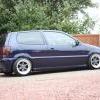
saving up for some image rims sae as chrispy's so thought i would photoshop some

what you think guys?

[mycarwheelsredcopy.jpg

mycarwheels.jpg

any one have any other ideas pleae photoshop for me, thanks

shaun

Edited by shaunfrazier

  • Replies 21
  • Views 1.1k
  • Created
  • Last Reply

Top Posters In This Topic

broken links

  • Author

sorted

Hummmmmmmm, I don't know If I like the wheels on your car mate. Red doesnt look right, white looks much better.

  • Author

yea i prefer white.

any other photoshops of wheels would be appreciated, need to make my mind up.lol

white looks mint!

red doesnt work!

i hate you a thousand times for getting the same wheels :lol:

  • Author

haha.lol

i just love what your rims look liek dude. its not my fault, haha.

any other ideas then? what other image wheels would look good?

pics?

cheers

Red looks quality, nice contrast to the paintwork.

White has been done and will be a pain to keep clean. :D

Get them if you like em!

i love loads of designs on there the HT design are nice and i darent look at the billet ones! for fear of buying a set in each colour! HAHAHAHA

  • Author

haha, i know there so nice, i love all the designs.lol

color coded ?

  • Author

mycarwheelssilver.jpg

mycarwheelsblue.jpg

2 more guys

mycarwheelsblue.jpg

deffo this one, looks sweet as

also i wish my paint was as mint as yours :-( lol

Edited by polo g

  • Author

yea I'm liking the blue or the white.

dunno if it works on dark colured cars though.

anyone got any pics of a dark blue car with a simaler setup?

thanks

shaun

Just steal chrispy's, won't have to paint them then :lol:

But I reckon white, looks cool as

you need some image rims in your life!

white or CC :)

  • Author

any other opinions?

bronze :-(

  • Author

you and bloody bronze, haha

the cc ones look mint

colour coded will kick ass

CC all the way..

Create an account or sign in to comment

Recently Browsing 0

  • No registered users viewing this page.

Account

Navigation

Search

Search

Configure browser push notifications

Chrome (Android)
  1. Tap the lock icon next to the address bar.
  2. Tap Permissions → Notifications.
  3. Adjust your preference.
Chrome (Desktop)
  1. Click the padlock icon in the address bar.
  2. Select Site settings.
  3. Find Notifications and adjust your preference.