

Skip to content

its gone from autotrader, does anyone know of a 2001 polo black for sale around the area of sheffield?
Featured Replies

OK now I'm a little bit pissed off :x LOL.

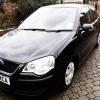
tommorow me and my mum have planned to go and see a mrk5 6n2 2001 reg colour black, it was 89 miles from me and my mum had prepared and shes gone to sleep now. I just refreshed the page on autotrader, and its gone, probly sold, it was the only 2001 black polo that was available.

Can someone helpp me out, like does anyone ehre know of a black 2001 for sale in range of sheffield, around 70 miles out, not too far.

cheers, :-)

lewis

  • Replies 10
  • Views 973
  • Created
  • Last Reply

Top Posters In This Topic

Probably sold.

  • Author

yeah probly mate lol, its crap caus theres no more left in black not even a 100 miles away from my location.

i bet there is one, it just isnt in autotrader and i dont know where it is lol.

lewis. :-)

If you planned to see it tomorow do you not have a contact number?

  • Author

yeah i got a phone number, but even on her website, shes taken it down, so it must be sold, iw as gonna ring her in the mornin and tell her I'm on my way, no point now.

dam why are black 2001's so hard to find?

lol

lewis. :-D

dont give up dude, just give her a text see whats going on.

  • Author

yeah ill try to buddy in the mornin i bet shes alseep now lol.

cheers man,

lewis :-D

you should by a car going by its mechanical health/bodywork. not the bloody colour!

what about the classifieds on ebay?

  • Author

dam just checked ebay and theres a few, but there like 138 miles away from me :S DAM lol

cheers anyways mate,

lewis. :-D

simo on here is selling a 6n2 gti in black :-D if that helps

Create an account or sign in to comment

Recently Browsing 0

  • No registered users viewing this page.

Account

Navigation

Search

Search

Configure browser push notifications

Chrome (Android)
  1. Tap the lock icon next to the address bar.
  2. Tap Permissions → Notifications.
  3. Adjust your preference.
Chrome (Desktop)
  1. Click the padlock icon in the address bar.
  2. Select Site settings.
  3. Find Notifications and adjust your preference.