Skip to content

Newbie

Featured Replies

Thought I best say hello.

Just bough the most basic of basic Polo's, a low mileage X Reg VW Polo 1.0E

Currently looks like this:

polo.jpg

So, what can I do to make it look a little less dull?

Wheels, body, interior, etc?

  • Replies 5
  • Views 998
  • Created
  • Last Reply

Top Posters In This Topic

  • Author

Already have 2 T3 vans - one a Scooby powered Syncro and the other a Westy Camper I wanted something small and frugal.

This fits the bill but needs a few mods to make it look a bit different.

As an inveterate fiddler I was wondering about lowering or bigger wheels to fill the arches, etc

Do I keep the black strips or remove/colour code.

Off to scour the gallery, thanks for the links.

Cheers, Paul.

i'd say colour code everything but the grille and fit some lovely OEM wheels and start trawling the bay for the optional extras eg. cup holders, heated seats etc.

  • Author

Cheers chap, thanks for the tips.

May have scored a set of revolution alloys from a Goffle that's about to be squashed.

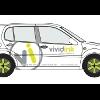
Thinking about getting them painted white or the same lime green as the logo and green and white chequerboarding the roof.

Also looking at a set of Eibach springs - a little bit lower and firmer but I get to keep my fillings.

Re colour coding - have been scouring t'interweb for white door handles and side strips etc - is there anywhere they can be bought or is it a hunt round the bay of fleas for suitable bits?

After market bits I am currently near to having are a set of lower fogs and appropriate honeycomb grilles (colour code or leave black?)

Good to see that there are lots of bits floating about to enhance the little fella.

Still makes me grin like a kid when I drive it.

Cheers, Paul.

  • Author

Ah, I see that I have not added the livery ideas for the car:

polo_design-1.jpg

And from the rear with lower springs and wider wheels:

polo_design-1.jpg

Create an account or sign in to comment

Recently Browsing 0

  • No registered users viewing this page.

Account

Navigation

Search

Search

Configure browser push notifications

Chrome (Android)
  1. Tap the lock icon next to the address bar.
  2. Tap Permissions → Notifications.
  3. Adjust your preference.
Chrome (Desktop)
  1. Click the padlock icon in the address bar.
  2. Select Site settings.
  3. Find Notifications and adjust your preference.