Skip to content

Anyone seen this before?

Featured Replies

3612151760_3ebeda086f.jpg

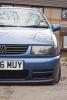
Has anyone ever seen a build thread of this Polo before? I think the colour is awesome and wanted to find out the paint code.

  • Replies 16
  • Views 2.7k
  • Created
  • Last Reply

Top Posters In This Topic

Mercato blue same as mine

Owner's name is Mati Verw. We had it shot for a feature on Max, but the mag closed before we had a chance to put it in print.

Shame, as it's a wicked car. It's got an Easter Island head as a gearknob.

  • Author

We now know the owner's name and that it's from Belgium. I remember seeing a rear view picture of it before, but can't find it anywhere now.

Alex, do you know the paint code of this?

Is it Mercanto Blue as leonh said?

We now know the owner's name and that it's from Belgium. I remember seeing a rear view picture of it before, but can't find it anywhere now.

Alex, do you know the paint code of this?

Is it Mercanto Blue as leonh said?

No idea mate. I don't even have his e-mail address any more :(

Hard to tell from that photo. It looks a bit dark for Mercato Blue, but it could be a filter on the camera. Mercato blue is a VAG colour commonly found on 9N Polos though. A moment or two on Google Images should sort you out with lots of examples.

i think its LA5M Mercatoblau

suprisingly more common on tourans, boras and the like as well as 6n2 and 9n

yeah its defo same colour as mine was so

LA5M Mercatoblau like above

  • Author

It looks a lot different to me. The one on the picture is lighter than the Mercatoblau. :(

I've seen this car in the flesh i am 99% sure it is the same colour as my old one

DSC01018b.jpg

my old one with a bit more light in the pic

Edited by Djsimmy

it is mercatoblau

  • Author

I'm more convinced now ;) cheers for the help everyone.

I've had that pic saved on the computer for years, but never knew whos it was

Create an account or sign in to comment

Recently Browsing 0

  • No registered users viewing this page.

Account

Navigation

Search

Search

Configure browser push notifications

Chrome (Android)
  1. Tap the lock icon next to the address bar.
  2. Tap Permissions → Notifications.
  3. Adjust your preference.
Chrome (Desktop)
  1. Click the padlock icon in the address bar.
  2. Select Site settings.
  3. Find Notifications and adjust your preference.