Skip to content

hi all I'm new to forum

Featured Replies

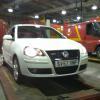
hi all I've just gone and bought a candy white polo gti 9n3 and this is my first vw and am loving the quality feel of the car. I've just left the french cars behind and wont go back :-D quinny

  • Replies 12
  • Views 1.3k
  • Created
  • Last Reply

Top Posters In This Topic

welcome to the forum

post some pics up of your car in the gallery, any plans for it as of yet or just drive it standard??

welcome :)

I've just left the french cars behind and wont go back :-D

Now if only I could get my mum to replace her 90, 000 mile Laguna estate with a VW. I would love it if she got a Golf estate but she has some irrational hatred of Golfs. No idea why.

post some pics up

x2 Haven't seen a white 6n2 before.

Welcomeee :)

post some pics up

x2 Haven't seen a white 6n2 before.

Its a 9n3 :lol:

Welcome dude, iv always liked those shape gtis 8-)

post some pics up

x2 Haven't seen a white 6n2 before.

Its a 9n3 :lol:

schooled again maltloaf!

you need to stop skimming through posts my friend.

I'm so jealous of you!!! I want a 9n3 gti, but ill never be able to afford one. :[

Get some pics up!!!!

Welcome btw :p

Typo >.< 6 & 9 are right ontop of each oth- :lol:.

I must have pressed 6 by accident.

Typo >.< 6 & 9 are right ontop of each oth- :lol:.

I must have pressed 6 by accident.

and missed the 2 and pressed 3 LOL

spazzy finger ?

Typo >.< 6 & 9 are right ontop of each oth- :lol:.

I must have pressed 6 by accident.

and missed the 2 and pressed 3 LOL

spazzy finger ?

Must be :lol:. I type too fast for my own good sometimes.

Welcome mate!

Get some pics up y0! :D

welcome to the forum

post some pics up of your car in the gallery, any plans for it as of yet or just drive it standard??

sorry to interrupt.. but how do i add some pictures on the gallery? :?

Create an account or sign in to comment

Recently Browsing 0

  • No registered users viewing this page.

Account

Navigation

Search

Search

Configure browser push notifications

Chrome (Android)
  1. Tap the lock icon next to the address bar.
  2. Tap Permissions → Notifications.
  3. Adjust your preference.
Chrome (Desktop)
  1. Click the padlock icon in the address bar.
  2. Select Site settings.
  3. Find Notifications and adjust your preference.