Skip to content

phills flash red 6n 5 door

Featured Replies

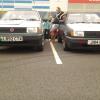
just thought i would show people how my car looks so far done quiet a bit including pedal box (a right c**t of a job)

all feedback welcome good or bad i dont mind its how i like it so far and on a shoe string budget its not bad

sorry about the crappy phone pics will take some better ones tomoz once i have cleaned it and use my new camera

Edited by 6n n3rd

  • Replies 4
  • Views 1.1k
  • Created
  • Last Reply

Top Posters In This Topic

Car looks clean enough, splittler need to be black again though.

or red

  • Author

Nar it was really dusty and dirty gave it a clean before the f1 today tho and I love the spiltter white it goes with the wheels and the badges lol will change it once I have got the bbs ra alloys on the but dunno what colour to go with next lol

  • 4 weeks later...
  • Author

As I have now lost my job I can't really afford to run the car so its being sornd ands put on my other halfs nans drive where I can start to do things to it without worrying that I have to drive it somewhere soon. I've got a few ideas of what I want to do with it so here's a list

Fn2 rears

Smooth and flush everything including rear door handles and boot handle (put everything on poppers)

Get a mk3 gti or vr6 golf interior and fit all of that

Seen a thing on mythbusters lastnight called bed liner and its tough won't rust or chip or dent easy and looks really good in the red so I might paint a few pannels and see how it looks and If its good then paint the whole car in that (my uncle owns a garage with a state of the art spray booth so lucky me)

Change the headliner maybe paint it red or black as its old a grubby now

Finally get some coilovers (used preferably as I don't have a job at the moment to keep the costs down)

And then some new wheels after the winter

All donations of parts are welcome. :unibrow:

Let me know what u all think all comments welcome good or bad

Create an account or sign in to comment

Recently Browsing 0

  • No registered users viewing this page.

Account

Navigation

Search

Search

Configure browser push notifications

Chrome (Android)
  1. Tap the lock icon next to the address bar.
  2. Tap Permissions → Notifications.
  3. Adjust your preference.
Chrome (Desktop)
  1. Click the padlock icon in the address bar.
  2. Select Site settings.
  3. Find Notifications and adjust your preference.