Skip to content

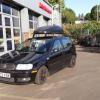
Polo tdi

Featured Replies

Year: 2001


Mileage: 122000


MOT: May 2016


Location: cosely


Price: 1250

Car has done 122k miles and has been serviced and repaired regardless of costs (mileage will go up slightly as still in use)

MOT may 16

Only 30 a year tax

Over the years its had

Timing belt and aux belt at 60k

New inner CV boots

Lowered suspension (PhilJ kit) then FK coilovers

Full service every year with MOT

ARB Bushes replaced four years ago

Waterpump upgraded at 84k (to one with metal impeller) Timing belt changed again

Discs and pads changed regularly

TRE's and arms, ARB droplinks, ball joints and wishbones changed 2014 along with sanddown and hammerite coat of rear beam and subframe

Full GTi interior swap

Gti front grill

Abc pillars trimmed I'm dark grey suede

Genuine votex rear sun blind

Custom Code remapped up to 108bhp and 185 lbs/ft torque

on standard 6 spoke alloys currently painted black with decent 185/55/14's

had new exide premium battery 2014 and new rear backbox

Carbon hydrodipped door handle inserts and heater control cover

6000k hid kit

Led side lights and fog lights

Roof bars also included with sale

Bad points

Both sills have a small dent, (not structual)

Drivers side wing has rust bubbles

Few dents in doors and stonechips and a dent on bonnet (daily driven)

£1250 ono

Contact scott

07711220169

post-25706-0-71933500-1460824713_thumb.j

post-25706-0-45832700-1460824807_thumb.j

post-25706-0-09625100-1460824841_thumb.j

post-25706-0-98111600-1460824864_thumb.j

post-25706-0-42821500-1460824885_thumb.j

post-25706-0-37326900-1460824906_thumb.j

post-25706-0-33212900-1460824936_thumb.j

post-25706-0-14814200-1460824967_thumb.j

post-25706-0-44260700-1460825013_thumb.j

  • Replies 2
  • Views 551
  • Created
  • Last Reply

Top Posters In This Topic

Posted Images

  • Author

Now with fresh mot may 2017 (13 months)

Any pictures?


Create an account or sign in to comment

Recently Browsing 0

  • No registered users viewing this page.

Important Information

We have placed cookies on your device to help make this website better. You can adjust your cookie settings, otherwise we'll assume you're okay to continue. Terms of Use Privacy Policy Guidelines

Account

Navigation

Search

Search

Configure browser push notifications

Chrome (Android)
  1. Tap the lock icon next to the address bar.
  2. Tap Permissions → Notifications.
  3. Adjust your preference.
Chrome (Desktop)
  1. Click the padlock icon in the address bar.
  2. Select Site settings.
  3. Find Notifications and adjust your preference.