Skip to content

VW Polo 9n 2002 Number plate & Dash Illumination Lights not working

Featured Replies

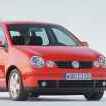
Hi so I'm pretty new to this site but have bumped into a problem with my Polo and not sure where my next move is.


So i bought some LED bulbs from Halfords for my number plate lights and after fitting them I turned my lights on to check them but they didn't work, so i decided to put my old ones back in but now the normal bulbs didn't work either. As i went to drive home i realised on my journey home that i also had no Dash illumination lights either and couldn't actually see how fast i was going. My first thought was a fuse problem so the next day i check the fuses and checked the user manual and found that they share the same fuse so obviously it must have been the fuse...  NOT! the fuse was fine and so were all my other fuses as i pulled them out one by one. After a little research online i found that someone had replaced their light switch (the dial below the drivers air blowers to turn the headlamps on) so i ordered a new light switch. Once that arrived I unplugged my old light switch and plugged in my new one... Nothing. so after replacing the bulbs, fuses and now replacing the light switch too I'm stuck and not really sure where to go next. If someone could please help ill be much appreciated!!! Thanks.

car details: VW Polo 9n 2002 1.2 - 3 door

  • 4 years later...
  • Replies 3
  • Views 6.3k
  • Created
  • Last Reply

Top Posters In This Topic

Good day sir I have the same problem what did you do to solve the problem 

I had a similar issue on an 02 Ibiza. I initially put it down to corrosion in the loom and bodged the plate lights off a tail light. When I investigated it more fully in VCDS, there looked to be a coding error for the rear lights, can't quite remember the in's and out's of it. The car had had a towbar fitted and wired in fairly poorly, so I'm not sure if the previous owner had messed it up or if it was caused by another fault. 

Make certain you're checking/replacing the right fuse first. LHD or RHD car and what year is it?

Edited by Pete1

Create an account or sign in to comment

Recently Browsing 0

  • No registered users viewing this page.

Important Information

We have placed cookies on your device to help make this website better. You can adjust your cookie settings, otherwise we'll assume you're okay to continue. Terms of Use Privacy Policy Guidelines

Account

Navigation

Search

Search

Configure browser push notifications

Chrome (Android)
  1. Tap the lock icon next to the address bar.
  2. Tap Permissions → Notifications.
  3. Adjust your preference.
Chrome (Desktop)
  1. Click the padlock icon in the address bar.
  2. Select Site settings.
  3. Find Notifications and adjust your preference.