Skip to content

Ford Ecoboost Turbo on a 6n2 1400 8v?

Featured Replies

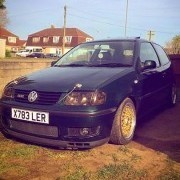
Hi, I have been using club polo for quite some time and become a member about a year ago so I thought it was about time I'd do a build thread of my own project or two. A few years ago I bought a polo 6n2 that had some previous modifications and with a few of my own has become great both on road and track with its superior handling (mods will be listed later). The only thing that lets the car down is the lack of power only being a 1400 8v (60hp standard). I am planning on swapping out the 1.4 for the 1.8t 20v sometime in the next two years. Before I do that I must finish my other big projects first but there's nothing wrong with a small project in my spare time with a few spare parts and a little bit of fabrication right? So thinking that I managed to get my hands on a perfectly good turbo off a 1.0 ecoboost engine that had blown internally and luckily enough I got it for nothing as it would have ended up in the scrap pile anyway. If this turbo is good enough or a 1.0 engine then surely it will be good for a 1.4 on low boost?             


I'm not expecting massive power gains or to spend hundreds or thousands to make it perfect, just messing around with the engine and a small turbo and a few tools in my spare time for a bit of fun.


I'll post more pics and keep this thread updated as much and as soon as I can when I start this small project (hopefully soon) but here's a few pics I took when I was measuring up the parts and as always when starting a project it looks like it all will fit and looks great but if experience has taught me anything it's that nothing is ever as simple as it looks 😉


IMG_20191211_143221.jpg

IMG_20191211_143122.jpg

IMG_20191211_143114.jpg

received_565457350857115.jpeg

Edited by General_GTI

  • 3 years later...
  • Replies 1
  • Views 2.3k
  • Created
  • Last Reply

Top Posters In This Topic

Popular Days

Posted Images

Did this ever get finished?

Create an account or sign in to comment

Recently Browsing 0

  • No registered users viewing this page.

Account

Navigation

Search

Search

Configure browser push notifications

Chrome (Android)
  1. Tap the lock icon next to the address bar.
  2. Tap Permissions → Notifications.
  3. Adjust your preference.
Chrome (Desktop)
  1. Click the padlock icon in the address bar.
  2. Select Site settings.
  3. Find Notifications and adjust your preference.