Skip to content

Headunit Problem

Featured Replies

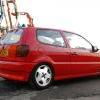
I've just got a mk4 polo picked it up today... tried to fit my headunit and I've got abit of a problem, wired it all up and tried to get it working but nothing is coming up on the screen and there is no sign of it turning on...

although when i put a cd in its taking it in then when i press eject its popping back out again... so its powered up but not working properly...

I've got this headunit...

http://cgi.ebay.co.uk/SONY-CDX-GT410U-CD-M...oQQcmdZViewItem

Item number: 120165217600

can anyone help?

thanks. mike

  • Replies 7
  • Views 1.3k
  • Created
  • Last Reply

Top Posters In This Topic

have you tried it with ignition on?

sounds like you only have the permenant live hooked up for the memory and not the main power feed

i'd put money on it being the fuse :)

  • Author
have you tried it with ignition on?

sounds like you only have the permenant live hooked up for the memory and not the main power feed

tried it with the ignition on, my dad said it might be the fuse too :lol:

put the ignition wire on the back yellow on the power red if its taking the cd then its got power but no ignition. the power wire generaly has a place to put the ignition it will run all the time though the key out.

might be a fuse on the ignition feed though. or brake in the wire.

  • Author

just been reading the manual and the headunit and sig lighter run through the same fuse so i checked the sig lighter and that doesnt work, took the fuse out and its blown, will sort a new one out tomorrow :)

will i be able to get one from halfrauds?

cheers for the help people

yes .

you can get a bag with all different ratings of fuses so you have spares for all your fuses

  • Author

problem solved, the fuse had blown, replaced it started the ignition and tried the sig lighter and it wasnt working, took the fuse out again and took the sig lighter out then replaced the fuse and tried the headunit, worked perfect, seems the sig lighter is blowing the fuse as soon as i try using it :lol: ah well it isnt needed

Create an account or sign in to comment

Recently Browsing 0

  • No registered users viewing this page.

Account

Navigation

Search

Search

Configure browser push notifications

Chrome (Android)
  1. Tap the lock icon next to the address bar.
  2. Tap Permissions → Notifications.
  3. Adjust your preference.
Chrome (Desktop)
  1. Click the padlock icon in the address bar.
  2. Select Site settings.
  3. Find Notifications and adjust your preference.