Skip to content

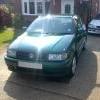
Polo mk4 16v

Featured Replies

Hey Guys!

Just bought a Green 16ver! woo hoo!! Just looking at stuff to get for it...

Anyone got a debage grill for sale?

Also, what speaker sets do people think are the best to replace the front setup with?

Cheers 8-)

  • Replies 13
  • Views 1.5k
  • Created
  • Last Reply

Top Posters In This Topic

I just got a bedaged grill from egay, £16 posted which i thought was pretty good.

Whats wrong with the standard speakers? Mine seem fine, they seem to be able to handle quite a beating!

Anyway you dont need a stereo when you have the sound of that lovely AFH to listen to :lol:

whats afh lol.?

whats afh lol.?

the engine code of the 16v engine

i have alpine components in my car which were about 100quid but depends on your budget i suppose you may want to spend dbl that :-D

philj sells debadged grilles on hear i believe get some piccies up! :p

Just get it up2 5000rpm and listen to the note it produces just there! Lovesss it!

Genesis Profile £180 but sound bloody amazing

Just get it up2 5000rpm and listen to the note it produces just there! Lovesss it!

id say 4100rpm lol

I'd say when you go from 4500rpm up to 5500rpm with the foot hard on the deck. One of the best noises I've ever heard come from a car engine!

The valver sounds amazing anything above 4000rpm really, so who needs sounds! Anyway, the standard mids are quite good for a small car stock speakers anyway. Nevertheless SPLs are quite good as are Focals too I think.

4167rpm is the best sounding TBH :lol:

Just when the raspy cam note comes in. Love it

  • Author

hahaha, yeah must say I do like the sound of the engine! But also like the sounds of my tunes at the same time! Il def take them into consideration...what size of the door speakers?

Def gona contact phil j on some debadge grill action!

Gona have some Polo GT stuf up for sale soon...watch this space!

Create an account or sign in to comment

Recently Browsing 0

  • No registered users viewing this page.

Account

Navigation

Search

Search

Configure browser push notifications

Chrome (Android)
  1. Tap the lock icon next to the address bar.
  2. Tap Permissions → Notifications.
  3. Adjust your preference.
Chrome (Desktop)
  1. Click the padlock icon in the address bar.
  2. Select Site settings.
  3. Find Notifications and adjust your preference.