Skip to content

Black 6n2 (gti?) Stafford

Featured Replies

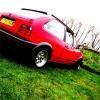
I saw this Yesterday at about 3.30-4ish. I was in the red mk3 that flashed you. any one on here? looked really nice :thumbsup:

  • Replies 9
  • Views 1.3k
  • Created
  • Last Reply

Top Posters In This Topic

I saw this Yesterday at about 3.30-4ish. I was in the red mk3 that flashed you. any one on here? looked really nice :thumbsup:

Weird, I just posted a thread about you!

That was me mate, What spec's your motor? it was looking sweet.

  • Author

Strange! yea its a g40 conversion with the usual mods carried out. shame we didnt see each other last week i had decent wheels on it then :lol:

yea as said yours looked really nice as i drove past nice and low 8-)

Sweet. cheers man, although too low for Stafford, these roads kill it! I'm used to smoother terrain (I live in South Wales, come to uni in Staffs).

  • Author

Yea i go to staffs uni to (doing motorsport) but i havnt seen your car about :? I dont think the roads are that bad here, there better then where i live but they arnt the best lol

Take a trip down Corporation or Prospect road, jokes. I guess I just live in bad area. My mate lives 3 minute walk away. Or 22 speed bumps by car!

I don't normally have my car up here. I've just brought it up for the last month so I can take my stuff back home on the weekend!

that street is a nightmare! I'm at uni here doin motorsport aswell! never seen either car but they look nice!

Spookey were you in uni today?

first year foundation degree, so i was on placement, only in on wednesdays atm... blue 6n2, on black BBS RXII's, Lowered, keep an eye out for me haha

  • Author

Tim, yea i was at uni yesterday but i wasnt in me car. I think your thinking of the other standard red g40 what somtimes in the car park. i dont know who ownes it but it does look nice.

Rowan, I've seen your car at the halls car park looks nice :thumbsup:

Create an account or sign in to comment

Recently Browsing 0

  • No registered users viewing this page.

Account

Navigation

Search

Search

Configure browser push notifications

Chrome (Android)
  1. Tap the lock icon next to the address bar.
  2. Tap Permissions → Notifications.
  3. Adjust your preference.
Chrome (Desktop)
  1. Click the padlock icon in the address bar.
  2. Select Site settings.
  3. Find Notifications and adjust your preference.